TurboCI
TurboCI is a GitLab CI/CD runner written in Rust. It speaks GitLab's runner API
like gitlab-runner does, so it
runs your existing .gitlab-ci.yml jobs unchanged. It runs each job in a Docker
container (default) or directly on the host (shell executor).
It is one binary (Linux x86_64 and aarch64, macOS on Apple Silicon) with no external services: no Redis, no database, no helper daemon.
| TurboCI | gitlab-runner 18.5.0 | |
|---|---|---|
| Pipeline of 5 Docker jobs, same host | 7.3 s | 13.0 s |
| Runner time per shell job, production | 1.1 s | 4.1 s |
| Binary, Linux x86_64 | 8.6 MB | 92.0 MB |
| Memory when idle | ~8 MB | 88 MB |
How these were measured: Benchmarks.
Install with one command See the benchmarks
-
Install with one command
Downloads a checksum-verified release, creates a systemd service and registers with GitLab. Installation →
-
Drop-in for GitLab jobs
Artifacts, cache, services,
needs, masked variables, cancellation and timeouts behave as on gitlab-runner. Pipeline support → -
One small binary
An 8.6 MB static binary with no external services that idles at about 8 MB of memory. It runs next to gitlab-runner on the same host and Docker daemon without touching its containers. Operations →
-
Fast jobs and caches
Checkout, image pulls, services and the job container start together, and the cache is restored while they do; caches are solid
tar.zstarchives extracted while they download, and skipped when a job left them unchanged. Configuration → -
Looks after the host
Stops taking jobs when memory, disk or load cross a limit, keeps workspaces, caches and unused images within size limits, exposes Prometheus metrics and reloads its config on
SIGHUP. Operations →
How it works
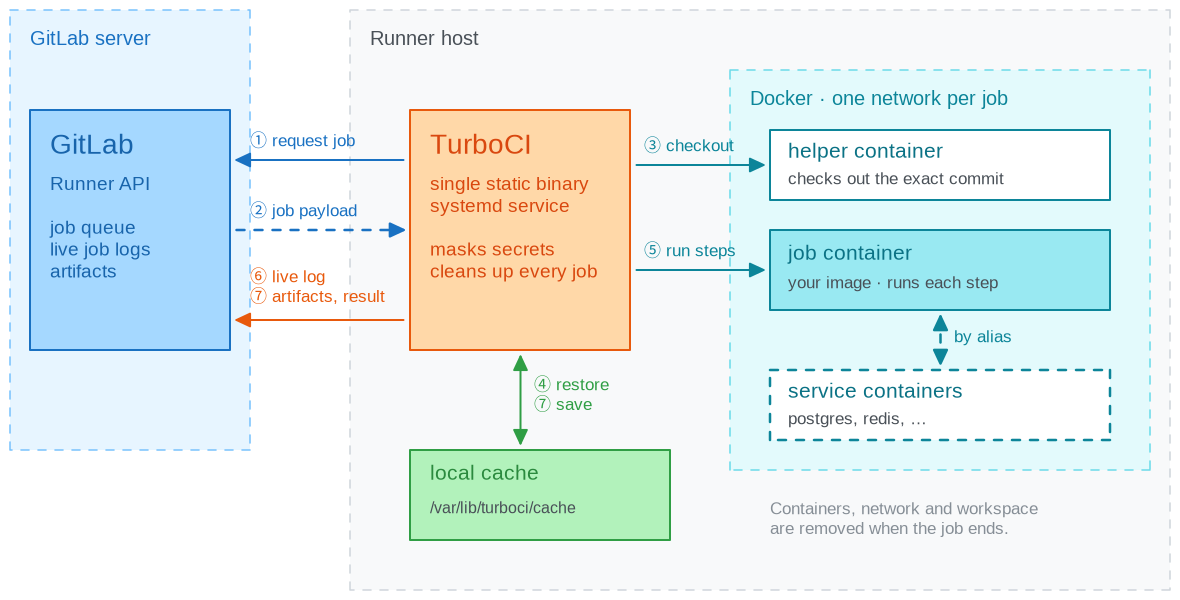
- Request. Whenever it has a free slot (
concurrent), the runner asks GitLab for a job, long-polling so a new job is picked up at once. - Payload. GitLab answers with the script, variables, image, services, cache and artifact settings.
- Checkout. A small helper container checks out the pipeline's exact
commit, so job images need no
git, while the job image is pulled and the services start. A project's next job fetches into the checkout the previous one left instead of cloning again. - Restore. The cache and the artifacts of earlier jobs are put into the workspace.
- Run. Each step runs in the job container; services are reachable by their aliases on the job's own network.
- Live log. Output streams to GitLab while the job runs, with secrets masked.
- Finish. Artifacts are uploaded, the cache is saved and the result is reported. Every container and network of the job is removed; the workspace is kept for the project's next job.
Status
TurboCI runs a team's CI in production on a self-hosted GitLab 19 instance, Docker and shell jobs, next to gitlab-runner on the same host. Things it does not do yet are listed under not supported; GitLab never sends such jobs to a runner that does not advertise the feature.